PDPA Core overview
PDPA Core is the personal-data-protection face of the platform, at the company's own address followed by /pdpa. It keeps the record of processing activities (ROPA) and its retention rules, the requests data subjects send under the Personal Data Protection Act B.E. 2562 (PDPA), the personal data breach file with its 72-hour Office notice, and the reports any staff member makes when something goes wrong. It shares the company, units, people, systems, vendors, actions and risk criteria with ERM Core and BCP Core, so nothing is typed twice.
The same sign-in opens every face. PDPA Core opens only where the platform has switched it on for the company. The database decides every read and every act; the screens offer only what the person's level allows, and an address outside the level's menu goes back to the home screen. Acts by the DPO and the privacy coordinator need the authenticator code, as in ERM Core.
Levels and menus
Section titled “Levels and menus”Each person sees PDPA Core at one level per company. The company administrator grants the two privacy roles in Roles ; the other levels follow from what the person already is.
| Level | Who | Menu |
|---|---|---|
| DPO | The person granted the DPO role for the company | Home, Report an incident, My actions, Dashboard, Breaches, Requests, ROPA, Disposal checks, ROPA import, Systems, Vendors, Letter templates, Notifications, User manual |
| Privacy coordinator | The person granted the privacy coordinator role | As the DPO; the database keeps the DPO's decisions (approve, decide, close, extend, refuse) for the DPO |
| Activity owner | A person named owner of an activity | Home, Report an incident, My actions, ROPA (own activities), Disposal checks (own), Notifications, User manual |
| Executive | Risk Management, executive or reviewer of the company in ERM Core | Home, Report an incident, My actions, Dashboard, Notifications, User manual — counts only, no requester and no breach narrative |
| Staff | Any other active person of the company | Home (one Report button), Report an incident, My actions, Notifications, User manual |
| Group view | Risk Management, executive or reviewer of a parent company, or its DPO | Group view — counts per subsidiary only |
A person with more than one company chooses the company in the account menu at the bottom of the side bar. On a phone the menu becomes a bar at the bottom of the screen with the things done on the move.
Home, dashboard and committee pack
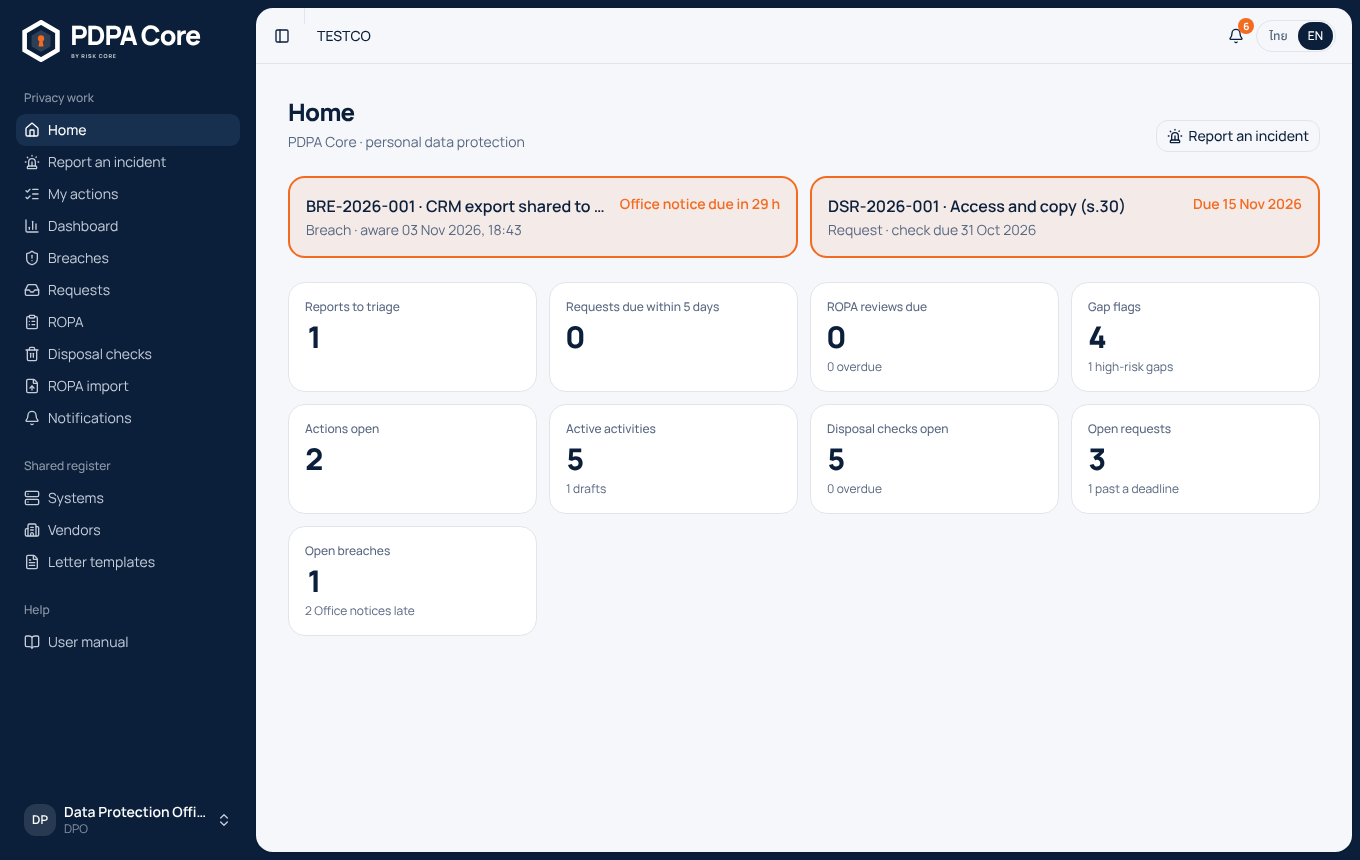
Section titled “Home, dashboard and committee pack”Home. For the DPO team, orange cards come first: every open breach with its 72-hour Office clock, and every request past a deadline. Orange is kept for these two things only. Below them are plain counters: reports to triage, requests due within 5 days, ROPA reviews due, gap flags, actions open, activities, disposal checks, open requests and open breaches; each opens the list behind it. An activity owner sees their own activities, reviews due, drafts and checks to answer. A staff member sees one button: Report an incident. Anyone with a PDPA action to do sees a line above the counters that opens My actions.
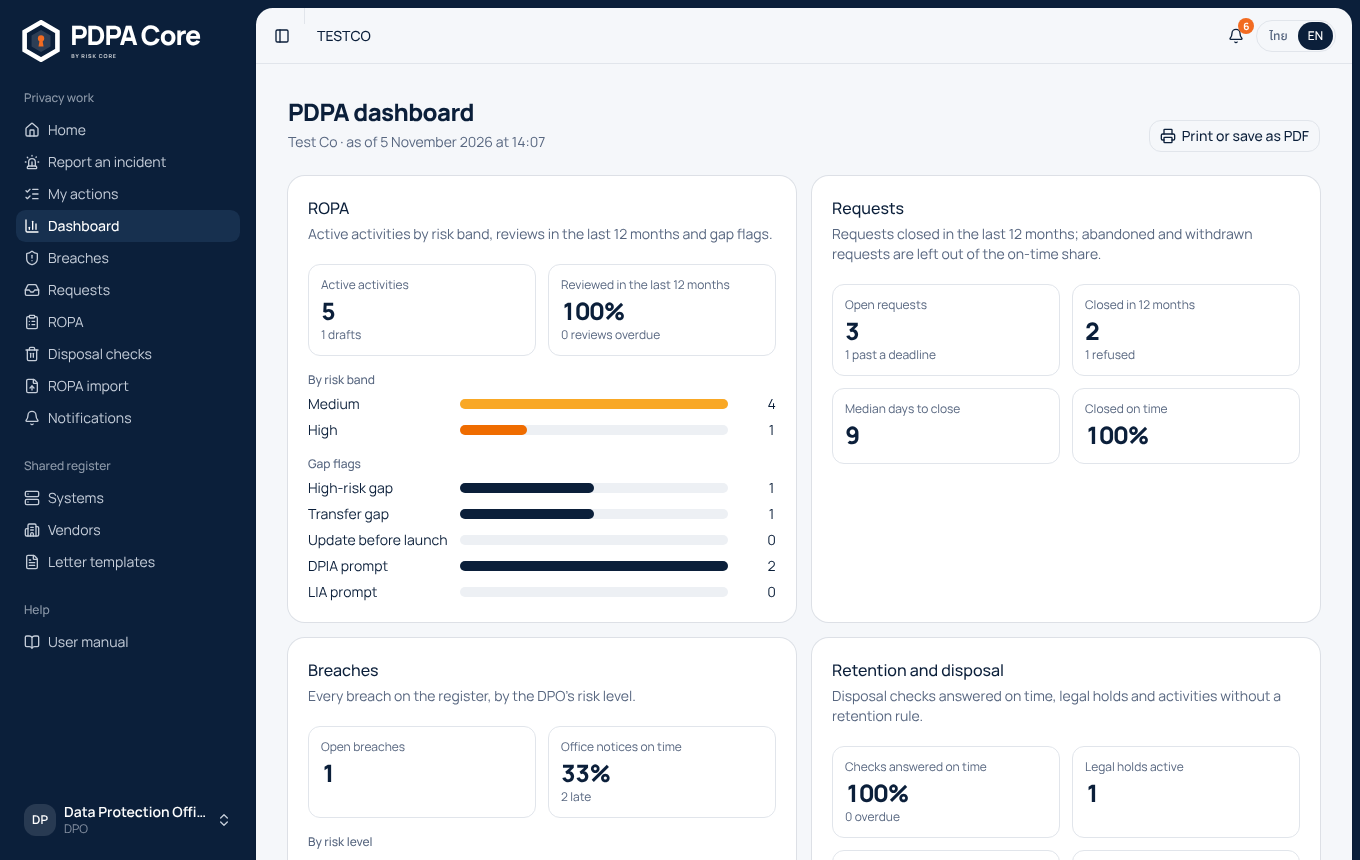
Dashboard. Dashboard shows the company's PDPA position on one page, for the DPO team and the executive level:
- ROPA: active activities, the share reviewed in the last 12 months, activities by risk band (colours from the company's criteria set), and gap flags;
- requests: open, past a deadline, closed in 12 months, refused, median days to close and the share closed on time (abandoned and withdrawn requests are left out of that share);
- breaches: open, by the DPO's risk level, and the share of Office notices made within 72 hours;
- retention and disposal: checks answered on time, legal holds, activities without a retention rule, disposals by method, and open PDPA actions.
Committee pack. Print or save as PDF prints the dashboard without the menus, stamped with the company and the time, for the risk or audit committee.