My actions
My actions
Section titled “My actions”My actions lists the PDPA actions the person owns — raised by the DPO team from a breach, an activity or a request, or raised by the database when an annual review is 30 days overdue. Every level has it, so a person who has no ERM Core login (a staff member, an activity owner) works on their actions here. Tabs: To do, Waiting for verification, Closed.
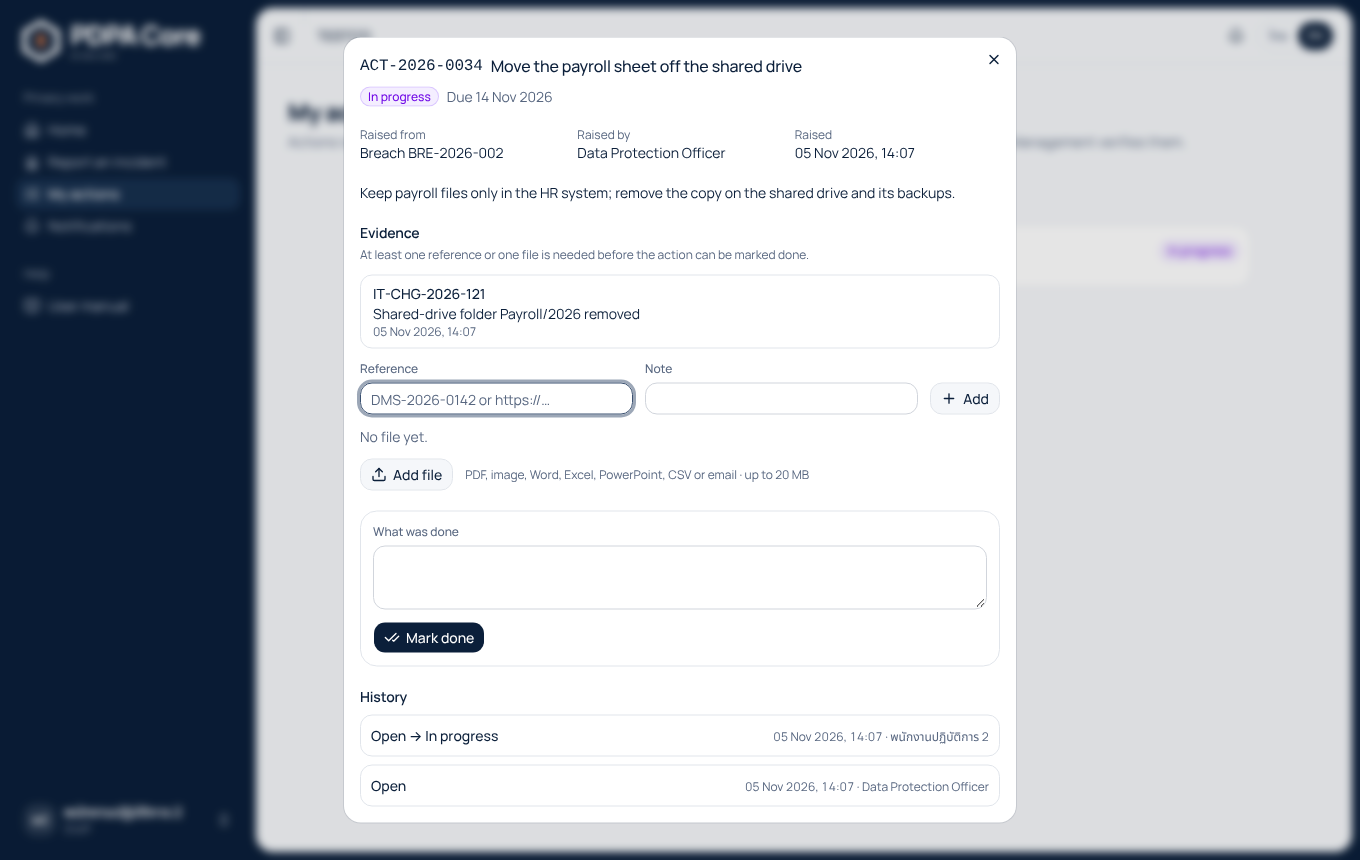
Choosing an action opens it:
- Start tells the DPO team and Risk Management that the work has begun;
- under Evidence, add a reference (a document number, file path or link, with a note) or a file — at least one is needed;
- under What was done, say what was done and press Mark done. The database refuses the step without that note or without evidence.
A done action waits for Risk Management, who verifies it in ERM Core or returns it with the reason; a returned action comes back to To do with the reason shown. A verified or cancelled action moves to Closed. The history lists every step with who took it. The owner cannot change the action's title, owner or due date here; the DPO team or Risk Management does that in ERM Core.
When the request an action came from reaches the end of its retention, the action shows "Requester details removed when the request's retention ended" with the date, its evidence references show "Removed", and no evidence or file can be added to it. Its title shows "Action from PDPA request" with the request's code and cannot be changed here or in ERM Core. A file removed then still counts as evidence, so the owner can still mark the action done with what was done; that note is removed the next night.